
1
Upload the source image
Choose the photograph or visual you want to recolor in JPG, PNG, or WebP format.
Change the visual palette of a photo automatically, direct it with selected colors, or borrow the palette from a reference image.

Choose the level of creative control that fits the image and the project.
Let AI choose a distinctly different but balanced palette while preserving the subject, lighting, and image structure.

Add one to six exact colors and make every selected swatch a visible part of the recolored composition.

Upload a second image and use its palette as a guide without replacing the original subject or layout.

Designers use Imgkits to compare color systems before committing to a full retouching workflow.
The palette mode helps me apply campaign colors without manually masking every object in the photo.

Elena Park
Brand Designer
Reference mode is useful when the color mood is already clear but the source image does not match it.

Theo Martin
Creative Producer
The before-and-after comparison makes it easy to decide whether a new palette still feels natural.

Samira Khan
Photo Editor
Upload the source, choose a color method, and compare the finished result.
Choose the photograph or visual you want to recolor in JPG, PNG, or WebP format.
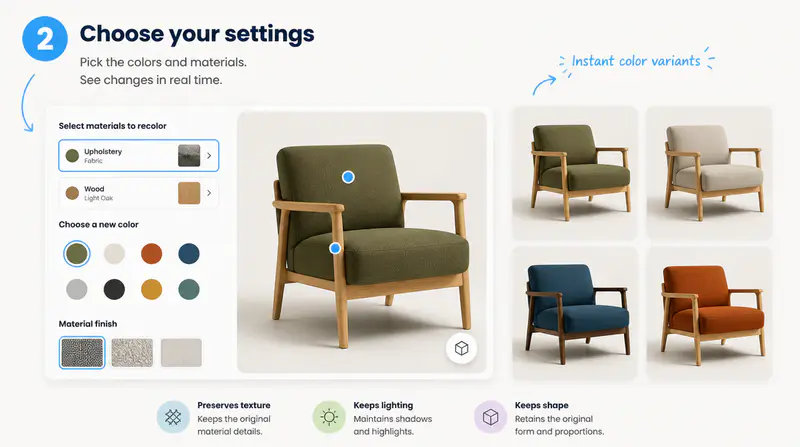
Use automatic recoloring, add up to six swatches, or upload a reference image with the palette you want.

Move the comparison slider to inspect the transformation, then download the finished image.
Can't find the answer you're looking for? Contact our support team
It changes the image palette while aiming to preserve the subject, overall structure, important details, and lighting relationships.
Yes. Palette mode lets you add one to six color swatches and asks the model to feature every selected color.
Upload a second image and the tool uses its colors as a guide while keeping the content and composition of the first image.
Yes. The result panel includes a draggable before-and-after comparison so you can inspect the change directly.
Each successful recolor uses 1 credit. Failed generations do not deduct a credit.
Keep exploring
Related Imgkits tools selected for the task you are working on.